
Other Technologies
 Standard routers are all different in a way that different routers support different ranges. The question arises which routers have the best range because range plays a key role in the network speed and reliability, mobility and other things as well.
 We all know that we need more bandwidth now, than we ever did in the past. There tons more online games, online movies, online collab work, you name it. And the past standards of Wifi namely 802.11a, 802.11b, 802.11g, 802.11n, and so on) were getting better and better; however, the 802.11ac does the trick. Well, atleast for now it is, until something better comes along.
 Domain Name System or DNS servers are dedicated computers that have network operating systems installed on them and are responsible for resolving hostnames (computer names) to their IP addresses and vice versa. DNS servers are used worldwide and are helpful while accessing the Internet and visiting websites. Every Internet Service Provider or ISP has its own DNS server which receives name resolution requests from the subscribers of that ISP and resolves the requested host names to their corresponding IP addresses.
 Allow me the to take you into the wonderful world of the Palm OS. This is the system that today powers over 75% of the personal mobile handheld market.
 Apart from star topology that is widely used in almost every network environment, the other type of topology that is complex while setting up but provides 100% fault tolerance to the network is Mesh Topology. In this topology, every computer that has to be connected to the network is connected to every computer that is available in the network. For example if there are four computers namely A, B, C and D, then A will be connected to B, C and D. Likewise B will be connected to A, C and D and so on. This means that when mesh topology is used while establishing a network setup, it is very unlikely that the network would ever face congestions or would ever fail.
 Get the hands on with Wireless Markup Language with WML tutorial. WML is a 'markup' language. This means that WML pages are written and saved as text files, using 'tags' like those found in HTML. Anyone familiar with HTML should find learning WML fairly easy
 Ever wonder if it's a good idea to switch your home LAN to wireless? This is a very easy to understand discussion about the security matters involved.
 With the Internet there came a whole new era of information technology, transfer and access. Also, the Internet connected the world in a way that has never been see before, through games. Alongside the Internet came huge amounts of brand new games, genres, software and a lot of other things. And also the Internet seems to be getting faster as we go into the future.
 You wouldn't go to a doctor who had never been to medical school, or hire a lawyer who never studied law. One side-effect of a world advancing as rapidly as ours is that fields are becoming more and more specialized and narrow. People can no longer get by on general knowledge in their careers, something I found out for myself not too long ago. I'd been out of high school for two years, scraping by on my own and picking up scraps of programming as I went. I saw all of the self-taught programmers breaking into the IT industry, and I hoped to do the same. After all, IT is one of the few industries out there where being creative and a quick learner is more important than a degree.
 LAN Bridges were used to separate and isolate multiple collision domains from each other in large broadcast domains. Bridges had two or more LAN ports to which other central devices, such as network Hubs, were connected via LAN cables. Unlike network Hubs that used to forward data packets to every PC that was connected to the ports, Bridges acted more like LAN Switches to identify destination ports and transferred the data packets only if the packets were destined to reach the segments that were connected to their other ends. Bridges used to calculate and identify the destination segments on the basis of physical (MAC) addresses of the central devices that were connected to their LAN ports.
 WiFi Security feature protects your network and gets quick access associated with Win2K, XP. It supports WEP or WPA and gives you real-time interloper alerts you from free blockers and you feel glad when there is no spyware and no adware in your network to spoil your files. Any users get access to the Internet by means of laptop, handhold games, smart cell phones and PDA. The most important thing is it tenders a trouble-free and cheap method to safe and sound your network connection at any hotspot all over the world. WiFi Security examines data and perceives entrance point in real time and identifies the user who wants to spoil your files.
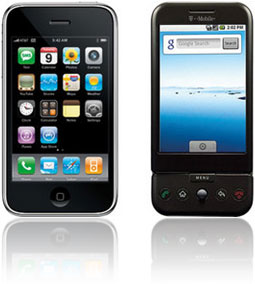 When the iPhone made its debut on June 29, 2007 the world went crazy. People lined up for blocks, camped out on sidewalks for days just to be the first to get their hands on the phone that would change their lives forever. However in 2009 iPhone 3G (3g Phone) was released and the mayhem started over. The iPhone seemingly had cornered the Smartphone market in spite of its hefty price tag of $600. Of course the price dropped significantly and those who waited could purchase the iPhone for under a $100.
 Since over a decade, star topologies have been preferred over bus topologies by the administrators. In star topology, a central device (Hub or Switch) is used to connect multiple PCs in a local area network. Central devices that are used in star topologies have multiple LAN ports integrated in them and the PCs are connected to the central devices via patch cables. In most cases patch cables are twisted pair cables that have four twisted pairs (eight wires in all) which are crimped to the RJ-45 connectors. The reason why star topology is mostly preferred nowadays is that it does not provide a single point of failure and is highly scalable. This means ...
 If you see someone who is wishing to do a reset on their home router there might be a lot of reasons for them to do it. The most common things are forgetting the admin password, forgetting the Wi-Fi security key and also troubleshooting problems with connection.
 A 60 GHz protocol is a network protocol that runs in a range that is close to 60 GHz, obviously. But, this is quite flexible as the range can go up to 64 and down to 57. If you compare other protocols like Wi-Fi or any other wireless protocol you will see that they are significantly lower (Wi-Fi is somewhere around 2-5 GHz). This major difference is what contributes to the problems and advantages in 60 GHz protocols.
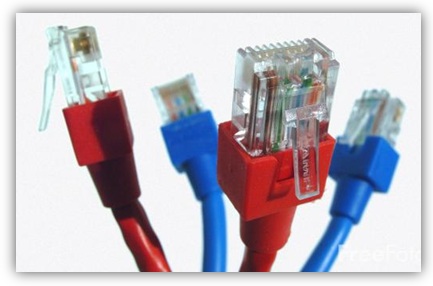 In any wired LAN environment it becomes necessary to take utmost care while selecting cables for the network setup. Engineers and administrators may select cable types according to the requirements of the LAN setup, budget involved in the infrastructure installation and the scalability of the network. Since cables play important role in any wired network infrastructure it becomes important for the administrators and engineers to select appropriate cable types so as to meet and fulfill the requirements of the organizations.
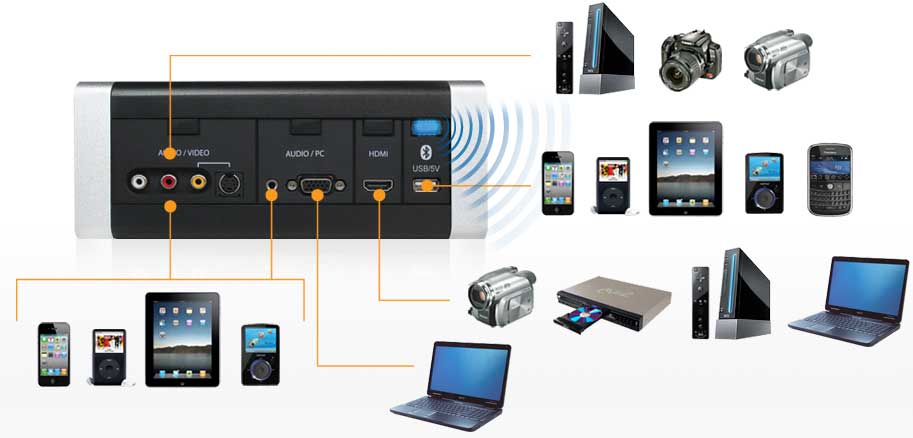 Recently, a new type of device has entered the market and it is called the Wireless media hub or the Wi-Fi disk. Those devices act a portable access point allowing you to literally carry your network around. They do this by establishing their own wireless network. There are also a lot of other things you can do with a media hub. You can charge your phone, you can offload data from your phone to free up memory, you can stream videos or music and a lot of other things as well.
 People sometimes refer to wireless networking as "Wi-Fi", even when the network uses a completely unrelated type of wireless technology. Although it may seem ideal to all the world of wireless devices using a common network protocol, such as Wi-Fi, rather today's networks support a wide range of protocols. Reason: No protocol ensures the existence of an optimal solution for all the different wireless customs that the people want. Some are better optimized to preserve battery life on mobile devices, while others offer higher speeds and more reliable and long-distance connections.
.png) This time we had the chance to try out a product from the Chinese firm D-Link, a renowned manufacturer of computer networking equipment. It is a product that is called Cloud Router and is classified by the marking DIR-605L. In the package, next to the router, you get a voltage adapter (5V DC, 1A), LAN cable, CD with instructions and software, as well as printed documentation.
This time we had the chance to try out a product from the Chinese firm D-Link, a renowned manufacturer of computer networking equipment. It is a product that is called Cloud Router and is classified by the marking DIR-605L. In the package, next to the router, you get a voltage adapter (5V DC, 1A), LAN cable, CD with instructions and software, as well as printed documentation. The speed of wireless routers is usually advertised in Mbps (megabits per second). The newest wireless routers claim to have speeds of 450 Mbps, while the outdated older models give only 11 Mbps. The huge speeds might entice you to buy them, but be aware that the speed you will be averaging is not anywhere near the maximum speed they state. And another this is that those new routers can't speed up your internet connection, you may get a bit more speed but it is probably not worth the cost.
 Sniffing and spoofing are security threats that target the lower layers of the networking infrastructure supporting applications that use the Internet. Users do not interact directly with these lower layers and are typically completely unaware that they exist. Without a deliberate consideration of these threats, it is impossible to build effective security into the higher levels. Sniffing is a passive security attack in which a machine separate from the intended destination reads data on a network. The term "sniffing" comes from the notion of "sniffing the ether" in an Ethernet network and is a bad pun on the two meanings of the word "ether." Passive security attack are those that do not alter the normal flow of data on a communication link or inject data into the link.
 In the world of computers, networking is the practice of linking two or more computing devices together for the exchange of data. Networks are built with a mix of computer hardware and software.
.jpg) Instead of cabling 2 computers directly, they can be connected in an indirect way through what is called a central network fixture. The central network fixture needs 2 network cables, and each one should connect one computer to the fixture. There are a few types of fixtures that exist and are used for home networking. See article for more info...
Instead of cabling 2 computers directly, they can be connected in an indirect way through what is called a central network fixture. The central network fixture needs 2 network cables, and each one should connect one computer to the fixture. There are a few types of fixtures that exist and are used for home networking. See article for more info... In the last article we have talked about the wired experience and all the pros and cons when it comes to speed, reliability and all the other things you need to enjoy playing video games on the web. In this text we are going to take a different approach and talk about wireless connections and everything that there is to know about them.
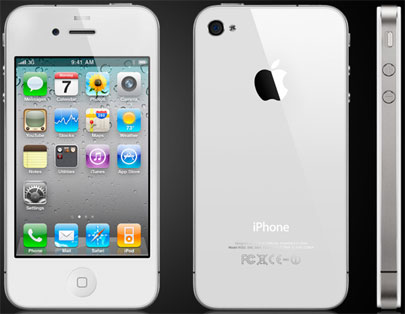 The new 3G Apple iPhone was released recently, to an audience who were pretty much on the edge of their seats with anticipation. The reviews have been largely favourable, with many bordering on zealous, such as the review by Alex Iskold on Read Write Web. In the review, which really isn't all that long, Iskold manages to tell us seven times that the iPhone is the new personal computer. In fact, according to Iskold, the new iPhone is the world's first really personal computer, and he seems pretty excited about that.
 Computer networks for home and small business can be built using either wired or wireless technology. Ethernet port is the traditional choice in homes, but Wi-Fi wireless technology is rapidly gaining importance. Wireline and wireless can claim advantages over others and both are great for home and other things such as local area networks (LAN).
 Network hubs were the central devices that network administrators used to use to establish a network setup using Star Topologies. Network hubs had multiple RJ-45 ports integrated in them and were used to connect one end of the LAN cables that had RJ-45 connectors crimped to them. The other end of the cables were connected to the RJ-45 ports available on the PCs. Network hubs were available with 4, 8, 16 and 24 ports. Administrators also used to cascade two hubs for larger network setups. Cascading means that one RJ-45 port of one hub connected to ...
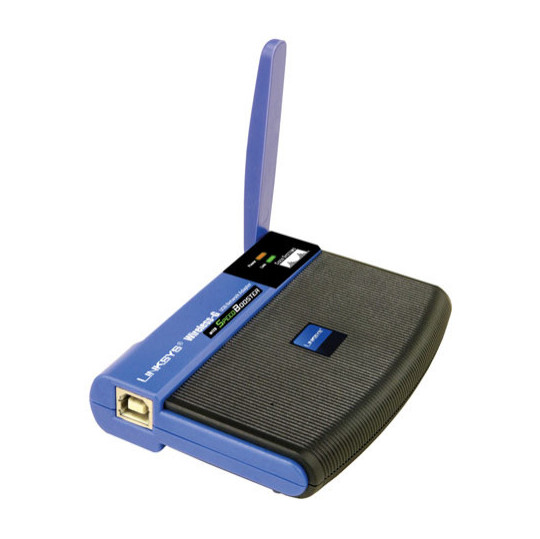
 The way networks work is that they use adapters to connect to hotspots. If you have a newer generation computer it will have a built in one but older ones don't have them. You can buy these adapters in stores. There are all sorts of adapter types like USB, PCI card and many more.
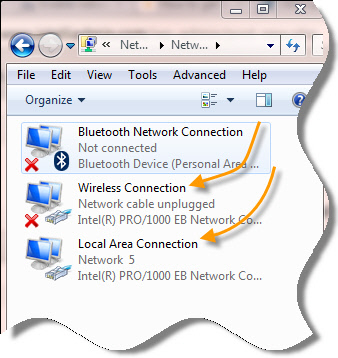 Did you recently find out that after your PC starts up fresh, your internet doesn't work? So you probably tried everything and the only thing that seems to work is to disable the "Local Area Connection" (adapter), and then to enable it back again. At least that's what happened to me.
I've had this problem for almost a year now but I finally want it stop. All the resources online tell me that it's probably my network driver that may need an update. Well, all my drivers are updated, and the problem still remains. Now What? Okay, I'll be honest... I don't know why it happens but 1 out of every 10 or 12 PC's will come across this problem.
 Routers are the devices that are used to connect two different networks in order to allow communication between them. Networks with different network IDs are considered to be different. By default, no communication can take place between two different networks, and this configuration prevents computers of one network from getting accessed by the computers on the other network, which may belong to another organization, building premises, home, etc.
.jpg) Do you want to get every computer in your home on the Internet? Do you want to share music, photo or video files stored on the computer? What do you think of stream movies? Well, you can do this and much more over the wireless networks.
Do you want to get every computer in your home on the Internet? Do you want to share music, photo or video files stored on the computer? What do you think of stream movies? Well, you can do this and much more over the wireless networks. Internetworking with TCP/IP has been around for many years-almost as many years as Unix has been available. TCP/IP, or Transmission Control Protocol/Internet Protocol, grew out of the work that was done with the Defense Advanced Research Projects Agency, or DARPA. In 1969, DARPA sponsored a project that became known as the ARPANET. This network mainly provided high-bandwidth connectivity between the major computing sites in government, educational, and research laboratories.
 On home or public wireless networks, your Wi-Fi connection can unexpectedly fall for no apparent reason. This kind of networking problem is particularly frustrating. It is also more common than you think. Fortunately, there are solutions. Consult this text to determine why this is happening and how to prevent it.
 As you see a business growing, it is normal that their layout of networks grows with them. Companies that are placed in a few locations will create internal connections that are called campus networks if their buildings are close to each other and use WAN networks if they are more distant.
 A long time ago there were problems with home automation because networks had a huge limitation about how much they could stretch. There were huge problems with wiring and differences in that wiring and that implied the use of phase couplers in order to bridge the signals. If you lived in a big house you would need long cables which then brought slow connections and problems with performance.
 In computer networks, scope (area) up to where data that is transferred over the cables or the wireless media with certain conditions is categorized in two domain main types. In complex network setups, because multiple segments are connected to each other via different types of central devices, it becomes important for the administrators to separate broadcast domains and reduce the numbers of collision domains. A central device in which collisions may occur is Hub because of it logical Bus Topology.When a DNS server role is installed on a network operating system, by default forward lookup zone is automatically created and the DNS server works as Caching Only server that caches the results of all the queries that it resolves. Forward lookup zone of a DNS server resolves IP addresses to their corresponding host names, is used in most network setups in production environments.
 Do you often feel tethered to your home computer or other electronic devices? Tired of the endless cords to untangle under your office desk? Then it's time to go completely wireless! It's easier than ever to live a completely wireless lifestyle, thanks to innovations in the consumer and business electronics industries. Review some of the latest gadgets and services that will have you free-wheeling it in no time.
 Bluetooth is a specification (IEEE 802.15.1) that uses low-power radio communications to connect phones, computers and other network devices over short distances without wires. The name Bluetooth is borrowed from Harald Bluetooth, King of Denmark that lived more than a 1,000 years ago.
 Do you need to copy a heavy file from another laptop without using pen drive or connecting cables? Of course, this can be done by using electronic transfer methods like ftp or online data storage systems. However, these methods are not only time consuming, they often lead to increased data transfer costs. Moreover, what if there is no internet connectivity available in the immediate vicinity? Under such circumstances, you can connect two laptops through Bluetooth and exchange files seamlessly.
 This articles give the brief intro into the world of GSM and the wireless. GSM, short for Global System for Mobile Communication, is the standard behind digital mobile phones.
 WAP stands for Wireless Application Protocol, a secure specification that allows users to access information instantly via handheld wireless devices such as mobile phones, pagers, two-way radios, smartphones and communicators. WAP is supported by all operating systems. Ones specifically engineered for handheld devices include Palm OS, EPOC, Windows CE, FLEXOS, OS/9, and Java OS.
.png) We mentioned that today smartphones and tablets are becoming the dominant devices for Internet access. Research shows that users of smartphone devices for Internet access prefer WiFi, regardless of the quality and availability of 3G/4G networks. Thus, users are increasingly turning to Wi-Fi access as an alternative to 3G access. 36% of Internet traffic today is carried out via WiFi.
We mentioned that today smartphones and tablets are becoming the dominant devices for Internet access. Research shows that users of smartphone devices for Internet access prefer WiFi, regardless of the quality and availability of 3G/4G networks. Thus, users are increasingly turning to Wi-Fi access as an alternative to 3G access. 36% of Internet traffic today is carried out via WiFi.  A firewall can be thought of as a gatekeeper who has been handed over a list of people whom he must allow to enter into the premises and/or the list of those people whose request to enter the premises must be denied straightforward. Just like the role of a gatekeeper, a firewall monitors incoming and outgoing network traffic to and from a computer system and allows or denies the communication of the computer with other computers that are connected to it via Local Area Network (LAN). Since in network communication, the packets are transported over the cable or through wireless media, a firewall allows or denies the communication on the basis of source ...
 In small-scale organizations and home environments, DHCP servers are installed normally and no class oriented configurations are done. The reason behind this is that by default all DHCP client computers belong to default DHCP class and as soon as DHCP scopes are configured and the DHCP servers become ready to assign dynamic addresses to the client computers, the DHCP clients start receiving the IP addresses without any additional administrative overheads. However, in order to allow DHCP servers to assign different ...
 Having a connection or performance problem with your wireless network? Do you have bad or occasionally low Wi-Fi signals or poor video or audio streaming? Here we will share some tips to increase Wi-Fi performance. And most do not even require spending money.Dynamic Host Configuration Protocol or DHCP servers are the dedicated computers that have network operating systems installed on them and are responsible for providing automatic IP addresses to all the client computers that are configured to obtain the addresses automatically.
 If your computer has a wireless (Wi-Fi) network adapter, you will see the wireless network icon when you click on the Settings button. In order to function, the wireless adapter standard must be equal to or older than the wireless router standard. For example, if the AC adapter in the computer is using a wireless 802.11n (also known as Wireless-N), but the router uses 802.11g (also known as Wireless-G), you will not be able to connect because the Wireless-G standard is an older version and does not recognize the Wireless-N.
 In short, SixthSense Technology allows a person access to data at will. It's much different than using your iPhone! Many who aren't much aware of the technology hear the description and try to think of it as a new gadgetry that connects us to the web like iPhone, or your other cell phones or mini laptops. Wrong!!!
 If you are a home network owner or perhaps a business network owner you are probably seeking to purchase WLAN (wireless local area network) devices and gear. There are a lot of devices and products that fit into the common wireless standard. They are also known as Wi-Fi technologies and the most common are 802.11a, 802.11b and 802.11g. In this text we will compare those standards and tell you the pros and cons of each one of them.
 There are not enough people who offer advice to help others learn about computer networks. For some reason, however, certain facts about networking tend to be misunderstood. This article describes the commonly held misconceptions that people have.
 The growth rate of data traffic in recent years has been an unprecedented trend in mobile communications. If consumption data in mobile networks continues to grow at the same pace, significant transformation in many aspects of the business is inevitable: the network, the business model, appliances, even users. The rapid growth of mobile broadband services and digital content (video streaming, online gaming, social networks) and sales growth of smartphones and tablet devices generate increasing traffic demands in mobile networks.
 LAN switches, which are also sometimes called intelligent hubs, are the networking devices that have completely dominated and replaced Hubs. The reason behind this is that unlike Hubs, that only used to regenerate the received packets and forward them to all the ports that they had, LAN switches create one-to-one virtual circuits directly to the ports to which the destination computers are connected. This reduces the time consumed while transferring the data packets from the source computers to the destination ones.
.jpg) If you have a wireless network and you have some problems with your connection, or you are just seeking knowledge about how that signal works, this is just the place where you should be. Read this text and find out something more about wireless and Wi-Fi signal strength.
If you have a wireless network and you have some problems with your connection, or you are just seeking knowledge about how that signal works, this is just the place where you should be. Read this text and find out something more about wireless and Wi-Fi signal strength. In any network setup, network topology plays an important role without which network cannot be established whatsoever. In other words, whenever two or more machines are connected to each other, a topology is automatically formed. Unlike wired networks that have multiple topologies, wireless networks have only two topologies namely Infrastructure and Ad Hoc. Since wireless networks work on unguided media, it makes sense to have limited number of topologies while configuring the wireless network setups. Moreover, since wireless networks are a bit complicated configure as compared to the wired networks, it is essential for the administrators to have ...
 In ring topology, data used to transfer in the form of ring where every computer that was connected to the network had two LAN cards and each LAN card was connected to the LAN card of its neighbor computer. Many times ring topology was preferred over bus topology because there were no collisions and the chances of network getting congested were next to 0%.
 There is a possibility that when you are using Wi-Fi, it doesn't matter if it is your home or a public place where you use it, sudden drops of connection occur. Unfortunately, it is not very rare. But there are things you can do that can help with this problem and you can see them below.
.jpg) It will probably happen that you have to connect into a wireless router in order to do some updates on the routers configuration. In order to gain access to the wireless router and it's configuration you need to be familiar with the IP address of the router and also you need to know the admin password and the username of the wireless router. It is not bad if you are knowledgeable in router problems and fixing those problems.
It will probably happen that you have to connect into a wireless router in order to do some updates on the routers configuration. In order to gain access to the wireless router and it's configuration you need to be familiar with the IP address of the router and also you need to know the admin password and the username of the wireless router. It is not bad if you are knowledgeable in router problems and fixing those problems. n a nutshell, network topologies are the physical alignments of computers and the way they are connected to each other. For example, if all the computers are connected to each other via a central device (Hub or Switch), the type of topology is Star. Likewise, if all the computers are connected to each other via a main cable, this means it is Bus Topology.
What is WIFI?
 Wireless Fidelity – popularly known as Wi-Fi, developed on IEEE 802.11 standards, is the recent technology advancement in wireless communication. As the name indicates, WI-FI provides wireless access to applications and data across a radio network. WI-FI sets up numerous ways to build up a connection between the transmitter and the receiver such as DSSS, FHSS, IR – Infrared and OFDM. The development on WI-FI technology began in 1997 when the Institute of Electrical and Electronic Engineers (IEEE) introduced the 802.11 technology that carried higher capacities of data across the network. This greatly interested some of major brands across the globe such as the world famous Cisco Systems or 3COM. Initially, the price of Wi-Fi was very high but around in 2002, the IT market witnessed the arrival of a break through product that worked under the new 802.11 g standards. In 2003, IEEE sanctioned the standard and the world saw the creation of affordable Wi-Fi for the masses.
Wi-Fi provides its users with the liberty of connecting to the Internet from any place such as their home, office or a public place without the hassles of plugging in the wires. Wi-Fi is quicker than the conventional modem for accessing information over a large network. With the help of different amplifiers, the users can easily change their location without disruption in their network access. Wi-Fi devices are compliant with each other to grant efficient access of information to the user. Wi-Fi location where the users can connect to the wireless network is called a Wi-Fi hotspot. Through the Wi-Fi hotspot, the users can even enhance their home business as accessing information through Wi-Fi is simple. Accessing a wireless network through a hotspot in some cases is cost-free while in some it may carry additional charges. Many standard Wi-Fi devices such as PCI, miniPCI, USB, Cardbus and PC card, ExpressCard make the Wi-Fi experience convenient and pleasurable for the users. Distance from a wireless network can lessen the signal strength to quite an extent; some devices such as Ermanno Pietrosemoli and EsLaRed of Venezuela Distance are used for amplifying the signal strength of the network. These devices create an embedded system that corresponds with any other node on the Internet.
The market is flooded with various Wi-Fi software tools. Each of these tools is specifically designed for different types of networks, operating systems and usage type. For accessing multiple network platforms, Aircrack-ng is by far the best amongst its counterparts. The preferred Wi-Fi software tools list for Windows users is: KNSGEM II, NetStumbler, OmniPeek, Stumbverter, WiFi Hopper, APTools. Unix users should pick any of the following: Aircrack, Aircrack-ptw, AirSnort, CoWPAtty,Karma . Whereas, Mac users are presented with these options: MacStumble, KisMAC, Kismet. It is imperative for users to pick out a Wi-Fi software tool that is compatible with their computer and its dynamics.
Visit WIFINotes.Com to read more.
|
|||