Computer Hardwares
Computer Training Excuses -

You wouldn't go to a doctor who had never been to medical school, or hire a lawyer who never studied law. One side-effect of a world advancing as rapidly as ours is that fields are becoming more and more specialized and narrow. People can no longer get by on general knowledge in their careers, something I found out for myself not too long ago. I'd been out of high school for two years, scraping by on my own and picking up scraps of programming as I went. I saw all of the self-taught programmers breaking into the IT industry, and I hoped to do the same. After all, IT is one of the few industries out there where being creative and a quick learner is more important than a degree.

Basics of Computer Hardware Maintenance -
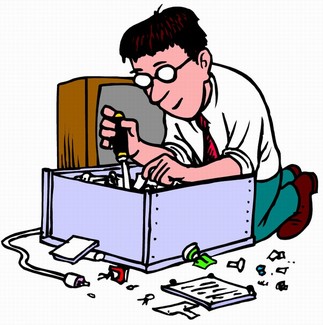 Fans in a computer cases can
 often cause overheating, and with that permanent damage to the component. It is necessary that you check your fans from time to time.
Components in the computer casing (
motherboard, processor, hard drive...) can't and mustn't be replaced by a person who is not an expert in these things.
Demon Possessed Computer Making Noises -
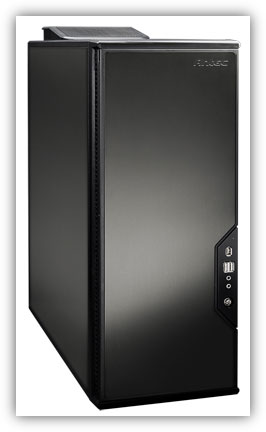 Much like your car, your PC may sometimes alert you to the fact that something is wrong. When you take your car to the repair shop you probably tell the technician that it is making some strange noise that you have never heard before. This often helps the technician diagnose the problem.
Computers have the same advantage. Often the noises that a PC makes will tell you what the problem is. I have tried to match the noise, tough to do when writing it, with the problem. Listen to your PC and then check below to see if you hear a match. Remember, if your PC is making noise that it didn't make when it was new means it has a problem and depending on the severity could cause permanent damage.
PC Overheating - Causes and Prevention Tips -
![PC Overheating]()
Overheating is your pc's biggest enemy; too much warm can fry its sensitive circuits and chips and send you shopping for a brand new system. Just as you need to keep your car engine awesome to prevent harm, you must do the same for the sensitive systems within the bonnet of your PC. Its fast rotating hard drives and quick micro-processors packed inside populated places can lead to dangerous warming up and potential devices harm. In fact, some high-performance hard disk can produce an unbelievable quantity of heat.
227 Categorized CompTIA A Plus Q and A -
CompTIA
A+ Certification is widely recognized as the first
certification you should receive in an
information technology (IT) career. Whether you are planning to specialize in
PC hardware, Windows operating system management, or
network management, the
CompTIA A+ Certification exams measure the baseline skills you need to master in order to begin your journey toward greater responsibilities and achievements in
information technology.
CompTIA A+ Certification is designed to be a "vendor-neutral" exam that measures your knowledge of industry-standard technology.
Motherboards and Their Components -
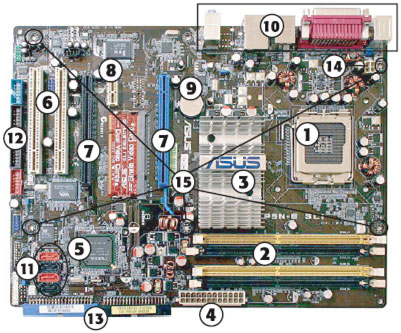
The motherboard represents the logical foundation of the computer. In other words, everything that makes a computer a computer must be attached to the motherboard. From the CPU to storage devices, from RAM to printer ports, the motherboard provides the connections that help them work together.
TW Tech Glossary - Misplaced your bible? Well here it is - Tech Glosasary! This truly took a while to complete and should be used by all from beginners to advance techies.
Types of PC Cases -
.jpg) Computer cases
Computer cases come in a variety of colors, designs, materials and for those who wish to bare all, there are clear acrylic cases available. You'll hear of all types of hardware lingo like:
ATX computer cases,
full tower computer cases,
desktop computer cases,
custom computer cases,
aluminum computer cases,
cheap computer cases,
gaming computer cases,
mini computer cases, and on and on and on...you get the drift.
3 Best Motherboards of 2011 -
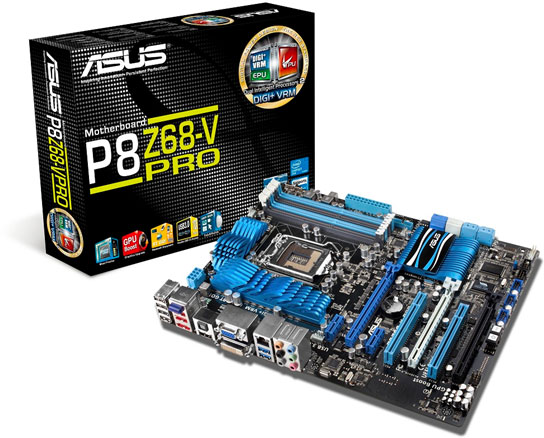
The tech-savvy should be well aware of the benefits of building their own personal computers. The relatively easy process of assembling various components can not only save you a boatload of money, but also supply you with the perfect rig for your individual needs. Whether you are updating a current machine or building a new one from scratch, the most important part you buy will probably be the motherboard. Involved in almost every major computing process, a motherboard can make or break your personal computer. However, technology is changing so rapidly that it's sometimes hard to know what's cutting edge and what's outdated. But, no matter what you're looking for, we've got you covered. Below are the three best motherboards of 2011, as determined by price, performance and durability. Since motherboards tend to be divided between Intel and AMD processors, a comparable board for the other processor is included in each category.
New Chieftec Dragon DX-02B -

A new year brings new things. The company
Chieftec introduced a new computer case designed for gamers that belongs to the popular
Dragon family, and it has got the mark
DX-02B. Unlike other solutions from the the Dragon family, the DX-02B has even better manufacturing quality, more powerful design and a very advanced cooling system that can chill even the hottest core components.
Toshiba LX830-108 -

The model we've tested comes to us from the Japanese manufacturer Toshiba and brings some interesting but also odd solutions for the balance of performance and functionality. The LX830-108 is placed in thickened monitor case with a diagonal of 23 inches using components designed for portable computers.
What is a Computer Case?
You seriously asking that? :)
Ok, dumb question; But did you know that almost all computers (mostly generic) can have thier case exchanged for a better, more efficient, and better ventilated case resulting in a better perfomance and looks for your computer? Well now you do!
Tips
Dust Filter
If you retro-fit a $2.99 dust filter on the fan intake of your desktop or laptop, you can save it from the inevitable dust bunnies. It's one of the best things you can do to keep dust out of your computer.
Mini Tower
Advantages: Excellent size which can be placed on top of below of a computer desk.
Disadvantages: While this case does offer upgradability it can be filled up much faster then the Mid-Sized tower.
Recommendations: Great PC for end-users and small businesses.
Mid-Size Tower
Advantages: Excellent case which can fit below and on top of your computer desk.
Plenty of expandability for new devices for businesses, end-users, and advanced users.
One of the most used computer cases found today.
Disadvantages: None
Recommendations: This case is an excellent choice for all users and businesses.
Full-Size Tower
Advantages: Excellent computer for upgradability.
Excellent case for a server machine.
Disadvantages: Cost is going to be a lot more then a standard case.
Generally a large case which cannot be placed on top or beneath a desk.
Recommendations: We recommend that this type of case be purchased by advanced users or users who plan to have a stand alone machine as a server.
Desktop
Advantages: Excellent desk computer.
Great use of desk space when monitor is placed on top of the computer.
Disadvantages: With some types of desktop cases can be very difficult to upgrade.
Does not really work on the floor.
Recommendations: Excellent choice for a business and home user computer. End users planning to upgrade or place computer on floor we recommend going with tower computer unless manufacturer provides desktop to be converted to tower.
Style
I am getting tired of the standard looking case. I would like to find a case with style and possibly a clear case. Where can I find a company that can supply me a case like this?
|
|
|
|
 Did You Know?
- 90% of the heat related problems in all laptops are due to faulty design of the casing.
- Sprucing up your cases vents will give you quite a boost of performance in both your video card and ram
- An awesome looking case that has very minimum ventilation is a bad case!

|
|
|
|
|
|